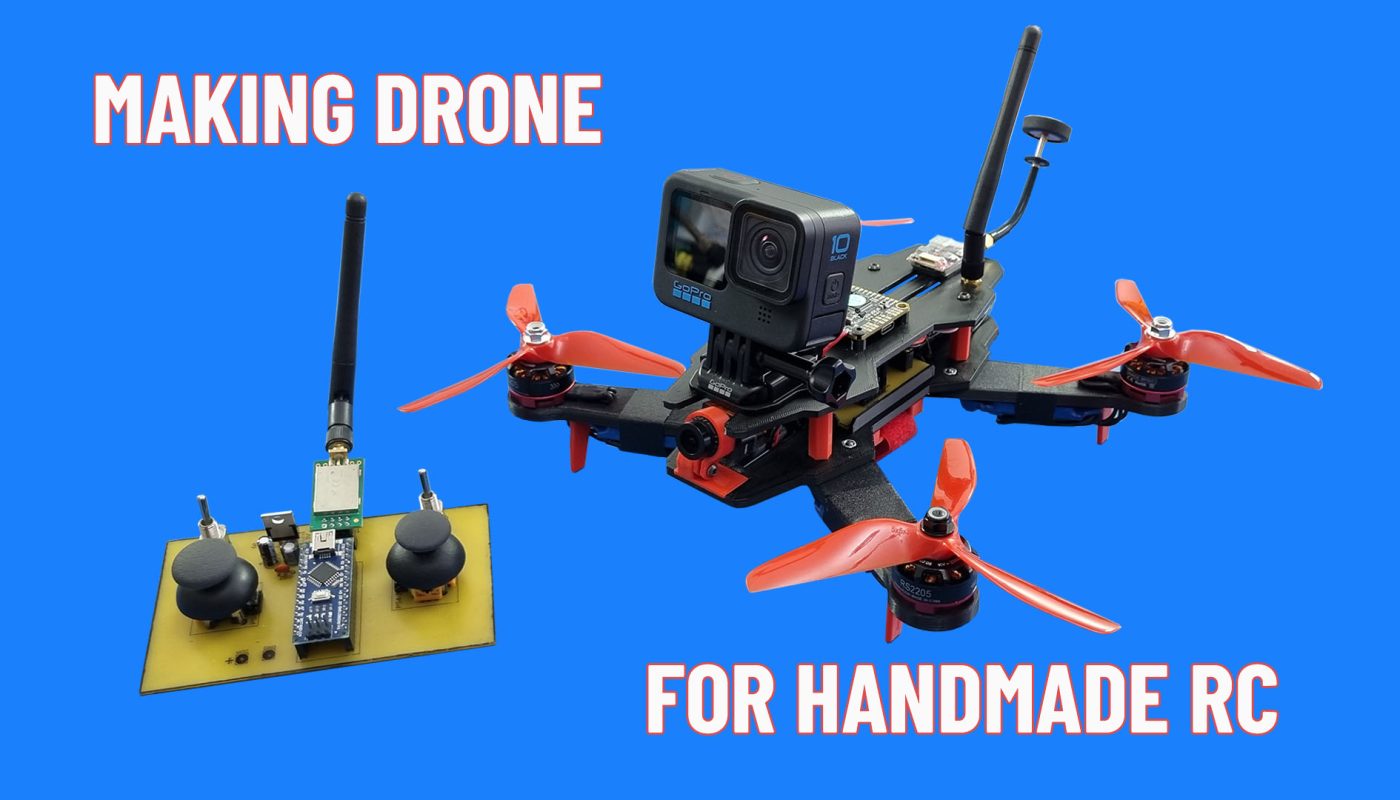
Making a 3D printed drone with Arduino remote control, which I shared the video of before. An FPV system can be added optionally. I made a design compatible with FPV camera and Gopro.. I made a compatible design for FPV camera and Gopro.
Required Materials:
BL Motor 2205 2300KV: https://s.click.aliexpress.com/e/_Dki3d91
ESC 20A BL: https://s.click.aliexpress.com/e/_DepNmoT OR https://s.click.aliexpress.com/e/_DF1tdIj
Flight Controller board: https://s.click.aliexpress.com/e/_DFxaPcn
PWM To SBUS Converter: https://s.click.aliexpress.com/e/_onfeGFx
5045 3-Blade Propellers: https://s.click.aliexpress.com/e/_DlgNnnl
M3 Screws: https://s.click.aliexpress.com/e/_DBJhYmJ
M3x10mm (6 pcs), M3x16 (4 pcs), M3x10mm (4 pcs), M3x8mm (16 pcs), M3x4mm (2PCS)
Male To Male Extension Cable: https://s.click.aliexpress.com/e/_okOvExF
Tape: https://s.click.aliexpress.com/e/_DmMPg55
For this drone I used the fixed wing aircraft ESCs that I have. If you choose high performance drone ESCs you will get a much more stable flight.
20A Drone ESC : https://s.click.aliexpress.com/e/_DnEBM4j
3D STL Files: https://www.printables.com/model/916200-fpv-drone

____________ Making Remote Control ____________
Diagram, Files and Details For RC: https://www.rcpano.net/2023/12/30/how-to-make-6-channel-radio-control-range-2000m/
Transmitter Code For Drone:
// 6 Channel Transmitter | 6 Kanal Verici
// KendinYap Channel

  #include <SPI.h>
  #include <nRF24L01.h>
  #include <RF24.h>
  const uint64_t pipeOut = 0xABCDABCD71LL;         // NOTE: The address in the Transmitter and Receiver code must be the same "0xABCDABCD71LL" | Verici ve Alıcı kodundaki adres aynı olmalıdır
  RF24 radio(9, 10);                               // select CE,CSN pin | CE ve CSN pinlerin seçimi

  struct Signal {
  byte throttle;
  byte pitch;
  byte roll;
  byte yaw;
  byte aux1;
  byte aux2;

};
  Signal data;
  void ResetData()
{
  data.throttle = 0;
  data.pitch = 127;
  data.roll = 127;
  data.yaw = 127;
  data.aux1 = 0;
  data.aux2 = 0;

}
  void setup()
{
                                       // Configure the NRF24 module  | NRF24 modül konfigürasyonu
  radio.begin();
  radio.openWritingPipe(pipeOut);
  radio.setChannel(100);
  radio.setAutoAck(false);
  radio.setDataRate(RF24_250KBPS);    // The lowest data rate value for more stable communication  | Daha kararlı iletişim için en düşük veri hızı.
  radio.setPALevel(RF24_PA_MAX);      // Output power is set for maximum range  |  Çıkış gücü maksimum menzil için ayarlanıyor.
  radio.stopListening();              // Start the radio comunication for Transmitter | Verici için sinyal iletişimini başlatır.
  ResetData();

}
                                      // Joystick center and its borders | Joystick merkez ve sınırları
  int Border_Map(int val, int lower, int middle, int upper, bool reverse)
{
  val = constrain(val, lower, upper);
  if ( val < middle )
  val = map(val, lower, middle, 0, 128);
  else
  val = map(val, middle, upper, 128, 255);
  return ( reverse ? 255 - val : val );
}
  void loop()
{

  data.roll = Border_Map( analogRead(A3), 0, 512, 1023, true );        // CH1   Note: "true" or "false" for signal direction | "true" veya "false" sinyal yönünü belirler
  data.pitch = Border_Map( analogRead(A0), 0, 512, 1023, false );       // CH2
  data.throttle = Border_Map( analogRead(A2),0, 340, 570, true );      // CH3   Note: For Single side ESC | Tek yönlü ESC için
  // data.throttle = Border_Map( analogRead(A2),0, 512, 1023, true );  // CH3   Note: For Bidirectional ESC | Çift yönlü ESC için
  data.yaw = Border_Map( analogRead(A1), 0, 492, 1023, true );        // CH4
  data.aux1 = digitalRead(0);                                          // CH5
  data.aux2 = digitalRead(3);                                          // CH6

  radio.write(&data, sizeof(Signal));
}
Receiver Code For Drone:
//  6 Channel Receiver | 6 Kanal Alıcı
// KendinYap Channel

#include <SPI.h>
#include <nRF24L01.h>
#include <RF24.h>
#include <Servo.h>

int ch_width_1 = 0;
int ch_width_2 = 0;
int ch_width_3 = 0;
int ch_width_4 = 0;
int ch_width_5 = 0;
int ch_width_6 = 0;

Servo ch1;
Servo ch2;
Servo ch3;
Servo ch4;
Servo ch5;
Servo ch6;

struct Signal {

byte throttle;
byte pitch;
byte roll;
byte yaw;
byte aux1;
byte aux2;

};

Signal data;

const uint64_t pipeIn = 0xABCDABCD71LL;
RF24 radio(9, 10);

void ResetData()
{

data.throttle = 0;                                         // Define the inicial value of each data input. | Veri girişlerinin başlangıç değerleri
data.roll = 127;
data.pitch = 127;
data.yaw = 127;
data.aux1 = 0;
data.aux2 = 0;

}

void setup()
{
                                                           // Set the pins for each PWM signal | Her bir PWM sinyal için pinler belirleniyor.
  ch1.attach(2);
  ch2.attach(3);
  ch3.attach(4);
  ch4.attach(5);
  ch5.attach(6);
  ch6.attach(7);

  ResetData();                                             // Configure the NRF24 module  | NRF24 Modül konfigürasyonu
  radio.begin();
  radio.openReadingPipe(1,pipeIn);
  radio.setChannel(100);
  radio.setAutoAck(false);
  radio.setDataRate(RF24_250KBPS);                         // The lowest data rate value for more stable communication  | Daha kararlı iletişim için en düşük veri hızı.
  radio.setPALevel(RF24_PA_MAX);                           // Output power is set for maximum |  Çıkış gücü maksimum için ayarlanıyor.
  radio.startListening();                                  // Start the radio comunication for receiver | Alıcı için sinyal iletişimini başlatır.

}

unsigned long lastRecvTime = 0;

void recvData()
{
while ( radio.available() ) {
radio.read(&data, sizeof(Signal));
lastRecvTime = millis();                                    // Receive the data | Data alınıyor
}
}

void loop()
{
recvData();
unsigned long now = millis();
if ( now - lastRecvTime > 1000 ) {
ResetData();                                                // Signal lost.. Reset data | Sinyal kayıpsa data resetleniyor
}

ch_width_1 = map(data.roll, 0, 255, 1000, 2000);
ch_width_2 = map(data.pitch, 0, 255, 1000, 2000);
ch_width_3 = map(data.throttle, 0, 255, 900, 2100);
ch_width_4 = map(data.yaw, 0, 255, 1000, 2000);
ch_width_5 = map(data.aux1, 0, 1, 1000, 2000);
ch_width_6 = map(data.aux2, 0, 1, 1000, 2000);

ch1.writeMicroseconds(ch_width_1);                          // Write the PWM signal | PWM sinyaller çıkışlara gönderiliyor
ch2.writeMicroseconds(ch_width_2);
ch3.writeMicroseconds(ch_width_3);
ch4.writeMicroseconds(ch_width_4);
ch5.writeMicroseconds(ch_width_5);
ch6.writeMicroseconds(ch_width_6);

}